
Make the finished landscape job the review trigger
A landscaping business may finish a one-day cleanup, maintain the same lawn each week, or spend months on a design and installation. Those jobs should not share an automatic “appointment complete” review trigger. Ask when the customer can judge the work, then record that the invitation was sent so the next visit does not start the process again.
Google allows businesses to share a direct review link or QR code and says reviews should reflect genuine experiences. Its Business Profile review guidance also encourages honest, balanced feedback. The operational choices below are a proposed workflow for landscapers, not a timing rule from Google.
If you are building your first system, start with the home-service review request guide. Landscaping adds an important closeout question: what does “finished” mean for this type of outdoor work?
Choose a completion point by service type
One-time lawn or yard cleanup
Mark the job complete after the crew finishes the agreed scope, removes debris, and sends any planned completion notice. If the client was away, allow enough time for them to see the property. A request later that day or the following day can be reasonable when the work is easy to inspect.
Landscape design and installation
Wait for the agreed handoff: final walkthrough, punch-list resolution, and care instructions. A planted yard may need time to establish, but the customer can still review the installation, communication, and handoff once those services are complete. Do not trigger an invitation from a deposit, design approval, or partial installation milestone.
Recurring mowing and maintenance
Choose a relationship milestone, such as the first completed visit or the first several visits, and set a conservative customer-level cap. Every weekly mowing ticket is a separate appointment, but it is not a reason to send a new request each week. If the scope changes materially, use a manager review before any later invitation.
Seasonal work and storm cleanup
Seasonal pruning, leaf removal, irrigation startup, or storm cleanup may be a distinct service for a current customer. Check the last request date and the actual scope before sending. Keep emergency or damage-resolution work with a named service owner until the agreed work is complete.
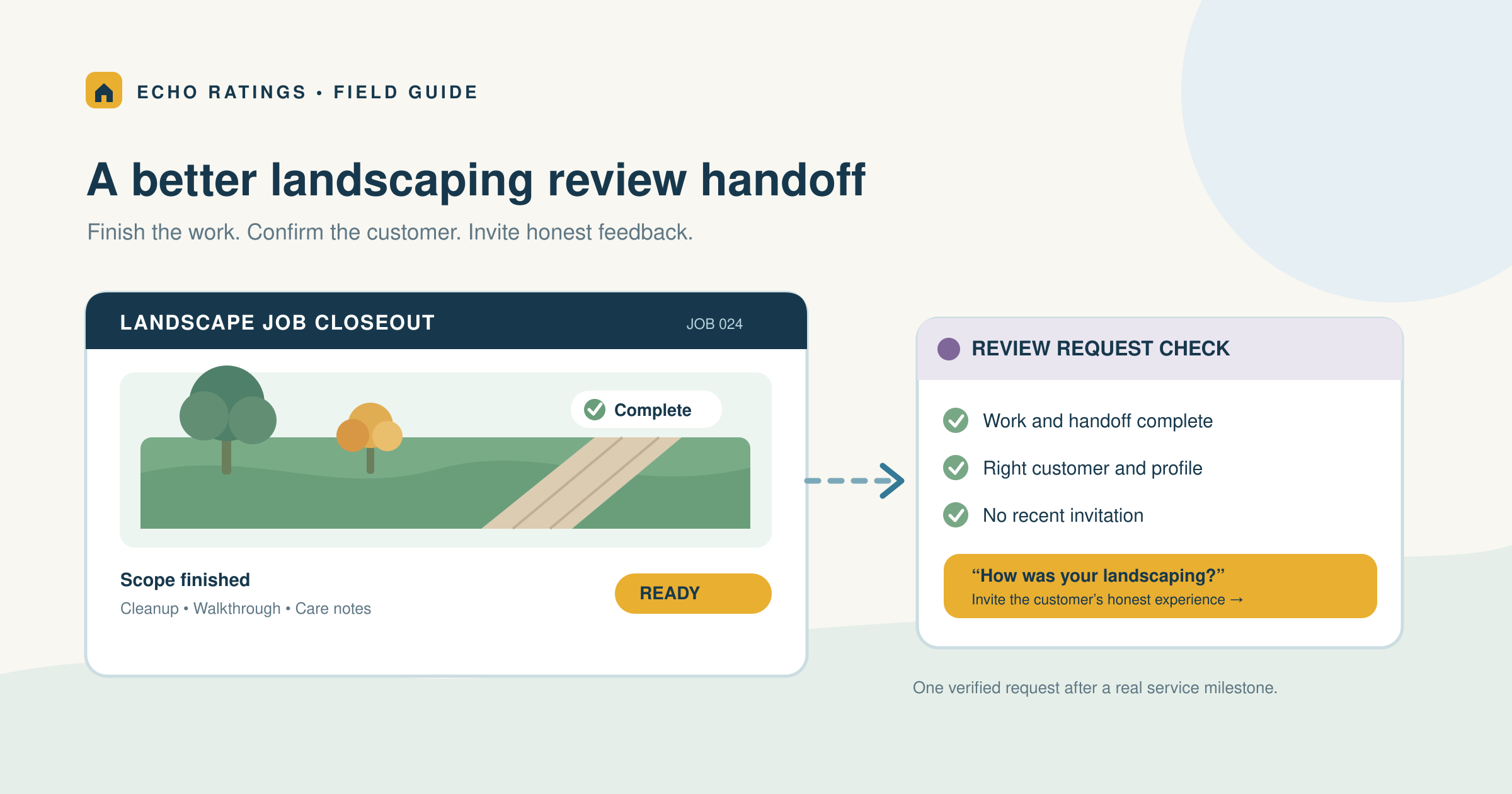
Write the rule down in the same terms your office and field crews use: “The job is complete, the correct customer and profile are confirmed, contact permission is recorded, and this household is within the request-frequency limit.” This gives the team a repeatable trigger instead of asking a crew member to guess who seems pleased.
Build a closeout handoff that your crew can use
A simple closeout record should include the job ID, customer and property IDs, service type, scope completion status, walkthrough or punch-list status, serving branch, contact preference, opt-out status, last request date, and the review-link destination. For a multi-day project, create the review event at final handoff rather than at each visit.
For an HOA or commercial property, identify the person who hired and can evaluate the work. A resident who sees the crew each week is not automatically the customer of record. If the property manager oversees several addresses, deduplicate at both the contact and account levels so five finished properties do not produce five identical messages in one afternoon.
The field team can confirm what was done and note a customer concern. The office or automation can check eligibility, suppress duplicates, and send the message at a reasonable local hour. The post-service automation guide
Make the handoff specific enough to audit. For example, a crew lead marks “work complete,” an office coordinator confirms the walkthrough and contact record, and the send rule checks the last invitation. If a return visit is promised for an irrigation adjustment or plant replacement, the owner should choose whether the contracted scope is complete before the invitation is queued.
Apply neutral eligibility rules
Hold test records, cancellations, jobs with no service, invalid contacts, opt-outs, duplicate households, and work that is genuinely unfinished. Give each hold a reason code and an owner. A complaint or low private-survey score should not silently remove a completed customer from the public-review audience. Google’s Maps content policy prohibits selectively soliciting positive reviews and discouraging negative ones. The review-gating guide
Send one clear invitation and stop politely
Use the verified Google review link for the profile that served the property. Google’s link and QR-code instructions explain how to obtain it. Test the link on a phone before the campaign runs. One neutral request and, if appropriate, one gentle reminder are easier on the customer relationship than a sequence tied to every appointment. Stop after a response, opt-out, delivery failure, or the reminder limit.
Use words a landscaping customer would recognize
One-time cleanup: “Thanks for trusting [Company] with your yard cleanup. If you would like to share how the service went, we would welcome an honest Google review: [verified review link].”
Completed installation: “Your landscape installation and final walkthrough are complete. We hope the care notes are useful. If you have a moment, please share your honest experience with our team: [verified review link].”
Recurring service milestone: “Thank you for having our team care for your property this season. If you would like to tell others about your experience so far, here is our Google review link: [verified review link].”
Replace the placeholders with the verified business name and link. Ask for an experience, not a star rating or a scripted description. The home-service templatesreview-link guide
Keep requests tied to real customers and the right profile
Do not ask employees, friends who were not customers, or a homeowner who only received a quote to review completed work. Keep review invitations free of compensation, benefits, or contests. Google’s contribution policyreview rule Q&A
A printed QR code on a closeout sheet can be an optional route for a customer to use later. Keep the handoff pressure-free. The crew should not stand over the homeowner or make a walkthrough sign-off depend on a review.
Do not require a customer to mention a neighborhood, city, crew member, or service keyword in the review. Google says merchants must not request specific review content. Let the customer describe the experience in their own words.
Check service-area and branch routing
Many landscaping companies travel to the customer’s property and do not receive customers at their operating address. Google’s Business Profile guidelines
If several branches use one booking system, store a stable branch ID on the work order and maintain a verified link for each eligible profile. The multi-location review guide
A franchise or company with several operating locations should not route every job to the highest-rated branch. Verify where the crew and business relationship belong before generating the link. If a profile is suspended or unavailable, fix the profile issue instead of silently routing customers to an unrelated location.
Respond to what customers actually say
When a positive review mentions communication, crew care, or a clean finish, thank the customer without copying the same reply across every review. For a critical review about plant health, irrigation, property damage, or a missed visit, acknowledge the concern and move the detailed investigation to a private channel. Google notes that replies are public and advises businesses to protect privacy in its review reply guidance.
Avoid posting the property address, gate code, schedule, contract price, photographs, or employee details in a public response. Do not claim that a low rating violates policy merely because the customer is unhappy. Investigate the service issue, then use Google’s reporting route only if the content appears to break its rules. The negative-review response guide
Measure coverage without confusing visits with customers
Landscaping creates many work orders for a small number of repeat clients. Report the number of unique eligible customers alongside completed jobs. Otherwise, a weekly mowing schedule can make request coverage look artificially low or push the team to message the same homeowner too often.
- Eligible completed customers by service type and branch
- Requests sent, held, suppressed, delivered, and opted out
- Requests per household within the chosen time window
- Wrong-profile links and duplicate sends
- New review themes and the age of recent reviews
- Public response coverage and open service issues
Use comments to identify work you can improve: arrival windows, crew communication, plant-care instructions, cleanup quality, scope changes, and follow-up. Do not promise that a particular number of reviews will produce a ranking or revenue result. Compare your own baseline and investigate the process behind changes.
A 30-day setup for a small landscaping team
Week 1: Define completed work
List your one-time, recurring, and project services. Name the closeout event for each, the customer or property ID, and who resolves incomplete work. Set one written frequency cap that applies regardless of expected sentiment.
Week 2: Verify the customer path
Check every Business Profile and direct review link on a phone. Preview the message. Test a finished cleanup, open punch list, repeat mowing visit, canceled job, opt-out, branch mismatch, and duplicate household.
Week 3: Pilot with one crew or service line
Compare completed jobs, unique eligible customers, holds, sends, and delivery errors. Ask the crew whether the closeout status matches what happened at the property. Correct the workflow before expanding it.
Week 4: Review and expand
Look at duplicate frequency, opt-outs, link routing, public responses, and service issues. Document changes so dispatch, sales, and field teams use the same rule. The contractor software guide
Frequently asked questions
When should a landscaper ask for a Google review?
After an eligible customer can reasonably assess completed work. That might be after a one-day cleanup, a final project walkthrough, or a milestone in recurring service. The exact timing is your operating choice, not a Google-mandated number of hours.
Should a mowing company ask every week?
No. Track the customer relationship and last invitation, not only the latest appointment. A recurring client should not receive a fresh request after every mowing ticket.
Can we use before-and-after photos with a request?
Use project photos only with the appropriate customer permission and follow your privacy practices. The request itself should simply invite the customer’s own honest account; do not prescribe what photos or praise they should post.
Can we ask after a complaint is resolved?
Use the same written eligibility rule for all completed customers and give the service issue an owner. Do not make access to the public review link conditional on a favorable private score or agreement to change a negative review.
Turn field work into a respectful feedback process
A landscaping review program works best when project closeout is clear, recurring customers are protected from duplicate messages, and feedback reaches the people who can improve service. Explore Echo Ratings for review requests, monitoring, and responses. Compare pricing, run a free reputation audit, start a trial, or talk with the team.
This article provides general operational information, not legal advice. Review messaging consent, privacy, advertising, and platform requirements with qualified advisors for your business.