
How to build a review system that earns trust
Home-service companies usually do not have a customer-satisfaction problem. They have a follow-through problem. A homeowner may be thrilled with the repair, installation, or cleanup, but once the technician leaves, the customer returns to work, dinner, family, and everything else competing for attention.
The solution is not to pressure customers or chase only the happiest ones. It is to create a consistent, respectful process that makes it easy for every genuine customer to share an honest experience.
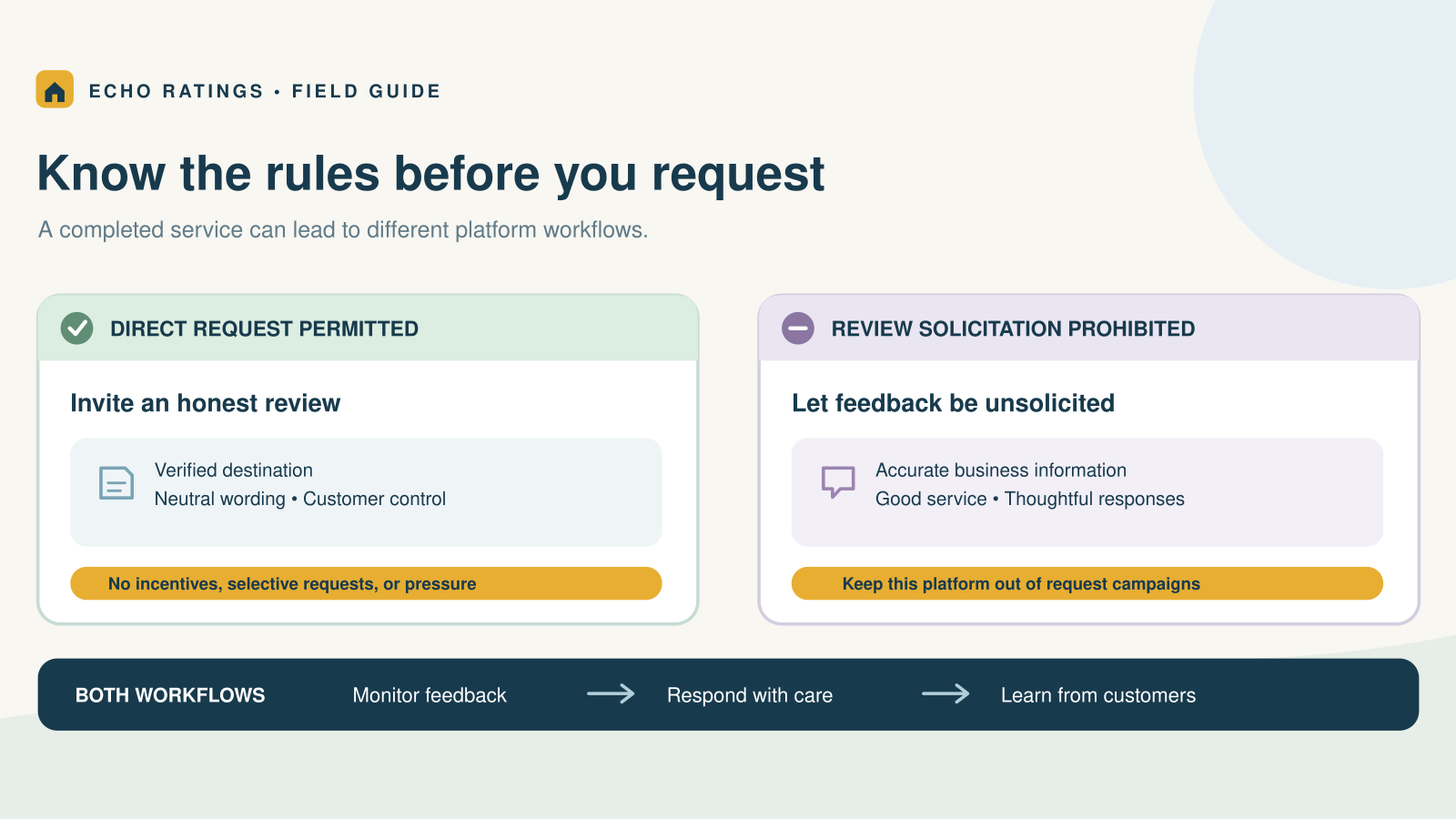
Google allows businesses to ask customers for reviews and provides a direct review link and QR code for that purpose. Google also makes clear that reviews should reflect genuine experiences. Incentives, pressure, and selectively requesting only positive reviews are prohibited. You can review Google’s official review-request guidance and Google Maps’ review policies.
The simple answer
To earn more Google reviews, ask every eligible customer shortly after a completed job, send them directly to your review form, keep the message brief, and use no more than one or two polite reminders. The process should invite honest feedback—not demand five stars.
What a compliant request system should do
- Ask customers who actually received a service.
- Use the same basic process regardless of whether the customer seemed happy or frustrated.
- Send customers directly to the business’s Google review page.
- Make clear that honest feedback is welcome.
- Avoid discounts, gifts, contest entries, or other incentives for Google reviews.
- Stop follow-ups once the customer responds or opts out.
This distinction matters. The Federal Trade Commission advises businesses not to ask only customers they expect to leave positive reviews. Its consumer-review rule also prohibits fake or false reviews and incentives conditioned on positive or negative sentiment. See the FTC’s guidance for marketers.

A seven-step Google review workflow for home-service businesses
1. Define the completed-job trigger
Choose one operational event that starts the request. For many service businesses, that is when the invoice is paid, the technician marks the job complete, or the customer signs off on the work. A consistent trigger prevents requests from being forgotten during busy days.
2. Send the first request while the experience is fresh
For short jobs such as plumbing repairs, electrical service, cleaning, or HVAC maintenance, send the first request within a few hours of completion. For projects such as roofing or remodeling, wait until the final walkthrough or punch-list items are complete. The right moment is after the customer has experienced the finished result—not while work is still underway.
3. Use the direct Google review link
Do not send customers to your homepage and expect them to find the review form. Generate the review link from your Google Business Profile and place it behind one clear button or short URL. Google also permits businesses to use the link in thank-you emails, receipts, chat interactions, and printed QR codes.
4. Keep the request human and neutral
A good request identifies the business, references the completed service, and asks for honest feedback. Avoid language such as “Please give us five stars,” “Help us keep our perfect rating,” or “If you loved the service, review us here.” Those phrases can pressure customers or skew who is asked.
5. Send one or two respectful reminders
Many customers intend to respond but forget. A reminder after two or three days is reasonable. If needed, send one final reminder roughly a week after the job. More messages can create irritation and undermine the goodwill the review request is supposed to capture.
6. Respond to the reviews you receive
Thank positive reviewers without copying the same sentence every time. For critical feedback, acknowledge the concern, remain calm, avoid sharing private customer details, and invite an offline conversation when appropriate. Google notes that helpful replies show customers that their feedback matters.
7. Measure the process—not just the star rating
Track completed jobs, requests delivered, link clicks, new reviews, response rate, and average time between job completion and the request. These numbers reveal whether the process is working without encouraging staff to manipulate the rating itself.
Review-request templates you can use
Personalization should be light and accurate. A customer’s first name, the business name, and the type of completed service are usually enough. Do not include private service details in a public-facing review prompt.
Initial SMS request
Hi [First name], thank you for choosing [Business name] for your [service]. Would you be willing to share an honest review of your experience? It only takes a minute: [Google review link]. Reply STOP to opt out.
Short SMS version
Thanks for choosing [Business name], [First name]. We value honest feedback and would appreciate your review: [Google review link]. Reply STOP to opt out.
Email request
Subject: How did we do?
Hi [First name],
Thank you for trusting [Business name] with your [service]. Your feedback helps our team improve and helps local homeowners make informed decisions. If you have a moment, please share an honest review here:
Share your experience — [Google review link]
Thank you,
[Business name]
Polite follow-up
Hi [First name], just a quick follow-up from [Business name]. If you have not had a chance to share feedback about your recent service, you can leave an honest review here: [Google review link]. Thank you.
Timing by home-service category
- HVAC, plumbing, and electrical: after the repair is complete and the system is working.
- Cleaning and landscaping: after the customer has seen the finished work.
- Roofing and remodeling: after the final walkthrough and agreed corrections.
- Emergency service: after the immediate problem is resolved, not during a stressful situation.
- Recurring service: after a meaningful milestone rather than after every visit.
The objective is consistency without fatigue. A customer should not receive duplicate requests because two employees closed the same job in different systems.
Common mistakes that put reviews at risk
Review gating
Review gating means using a satisfaction survey to route happy customers to Google while sending unhappy customers somewhere private. Google’s policy prohibits selectively soliciting positive reviews or discouraging negative ones. You can collect private feedback, but the opportunity to leave a public review should not depend on the customer’s sentiment.
Offering an incentive
Do not offer a discount, gift card, free service, contest entry, or employee reward tied to a positive Google review. Google prohibits incentives for reviews, and the FTC prohibits compensation conditioned on a particular sentiment. The cleanest policy is to avoid incentives for Google reviews altogether.
Asking for a five-star rating
Ask for an honest review, not a predetermined rating. Team goals should focus on sending requests consistently and delivering good service—not on pressuring customers to produce a particular score.
Writing or purchasing fake reviews
Never create reviews for customers, purchase review packages, or ask employees and relatives to pose as ordinary customers. Fake reviews can violate platform policies and federal rules, and they damage the credibility a review program is meant to build.
Frequently asked questions
Can a home-service business ask customers for Google reviews?
Yes. Google provides businesses with a direct link and QR code to request reviews. The request must seek genuine, unbiased feedback and must follow Google’s content policies.
Can we automate review requests?
Yes. Automation can send consistent requests after a legitimate completed-job trigger. Businesses should review their timing, message, audience, consent, and opt-out process and should avoid filtering requests based on expected sentiment.
How many reminders should we send?
One initial request and one or two polite reminders is a practical starting point. Monitor opt-outs and complaints, then reduce frequency if customers show fatigue.
Should we ask unhappy customers for reviews?
Use a neutral process for all eligible customers. You can also provide a private support channel to resolve service problems, but access to the public review request should not be restricted only to satisfied customers.
How long does it take to see results?
That depends on completed-job volume, message delivery, customer response, and the strength of the existing process. Establish a baseline, test the workflow for at least several weeks, and measure response rate instead of promising a specific number of reviews.
Build the next part of your review workflow
Ready to put this strategy into practice? Start with our Google review request templates for home-service businesses, then follow the step-by-step guide to automating requests after completed service calls. You can also run a free reputation audit to understand your current review position before changing the process.
Turn completed jobs into a consistent review process
The best review program is not a one-time campaign. It is a small, repeatable part of the customer journey: complete the work, send a respectful request, follow up carefully, respond thoughtfully, and measure the process.
Echo Ratings helps service businesses automate review requests, monitor feedback, and manage responses without losing the human judgment that protects customer trust. Explore our review management platform, review pricing, start a free trial, or book a demo.
This article provides general information and is not legal advice. Review platform policies and applicable laws may change.