Roofing reviews should follow a verified project milestone
Roofing work rarely ends at a single obvious moment. A repair may finish in one visit, a replacement can span several days, and an insurance-related project may remain open while documents, supplements, or final payments are still moving. If the review request goes out too early, the homeowner may receive it before cleanup, final inspection, or a promised follow-up. If it goes out weeks later, the details that made the experience memorable may be harder to recall.
The most dependable approach is to connect the request to an objective milestone that means the customer-facing work is complete. That milestone should be visible in the roofing company’s job-management system and applied consistently, regardless of whether the team expects praise or criticism.
Google says reviews should reflect genuine experiences and that businesses may remind customers to leave reviews through a link or QR code. Its current review guidance also emphasizes honest, balanced feedback. That makes a completed-project workflow a better foundation than relying on a salesperson, crew lead, or production manager to decide who should receive a request.
If your company is still building the basics, start with the home-service Google review guide. The process below adapts those principles to roofing’s longer timelines, multiple handoffs, weather delays, and service-area routing.
Define “complete” for each roofing job type
Use a short trigger map so the office, production team, and automation all follow the same rule. The accounting status alone is not always enough: a project can be paid before a final walkthrough, or a warranty visit can be completed without a new invoice.
- Roof repair: Work is finished, photos or notes are uploaded, debris is removed, and the customer has received any promised explanation or documentation.
- Full replacement: Installation and cleanup are complete, the project manager has handled the final walkthrough or completion call, and open punch-list items have an owner.
- Inspection or maintenance: The customer has received the findings or completed service—not merely an estimate that did not lead to work.
- Insurance-related project: The customer-facing scope is complete and the homeowner understands any remaining administrative steps. Do not wait indefinitely for a carrier process that is separate from the service experience.
- Warranty or callback visit: The follow-up work is complete and the customer has had a reasonable chance to confirm the issue was addressed.
Write the trigger in operational language, such as “production status changed to Complete and final walkthrough logged.” Avoid vague conditions like “customer seems happy” or “project manager approves.” A documented event is easier to audit, automate, and explain.
Confirm the request points to the correct roofing profile
Many roofers operate as service-area businesses, and some have separate crews or offices covering different markets. Google’s current Business Profile representation guidelines say service-area businesses should use accurate locations and service areas, and they explain when separate staffed locations may qualify for separate profiles.
Create a routing table that connects each job record to the verified profile that legitimately served the customer. Use a stable branch or territory ID, not a salesperson’s choice. Test every destination while signed out and on a mobile device. If a job cannot be routed confidently, place it in an exception queue instead of sending a generic company-wide link.
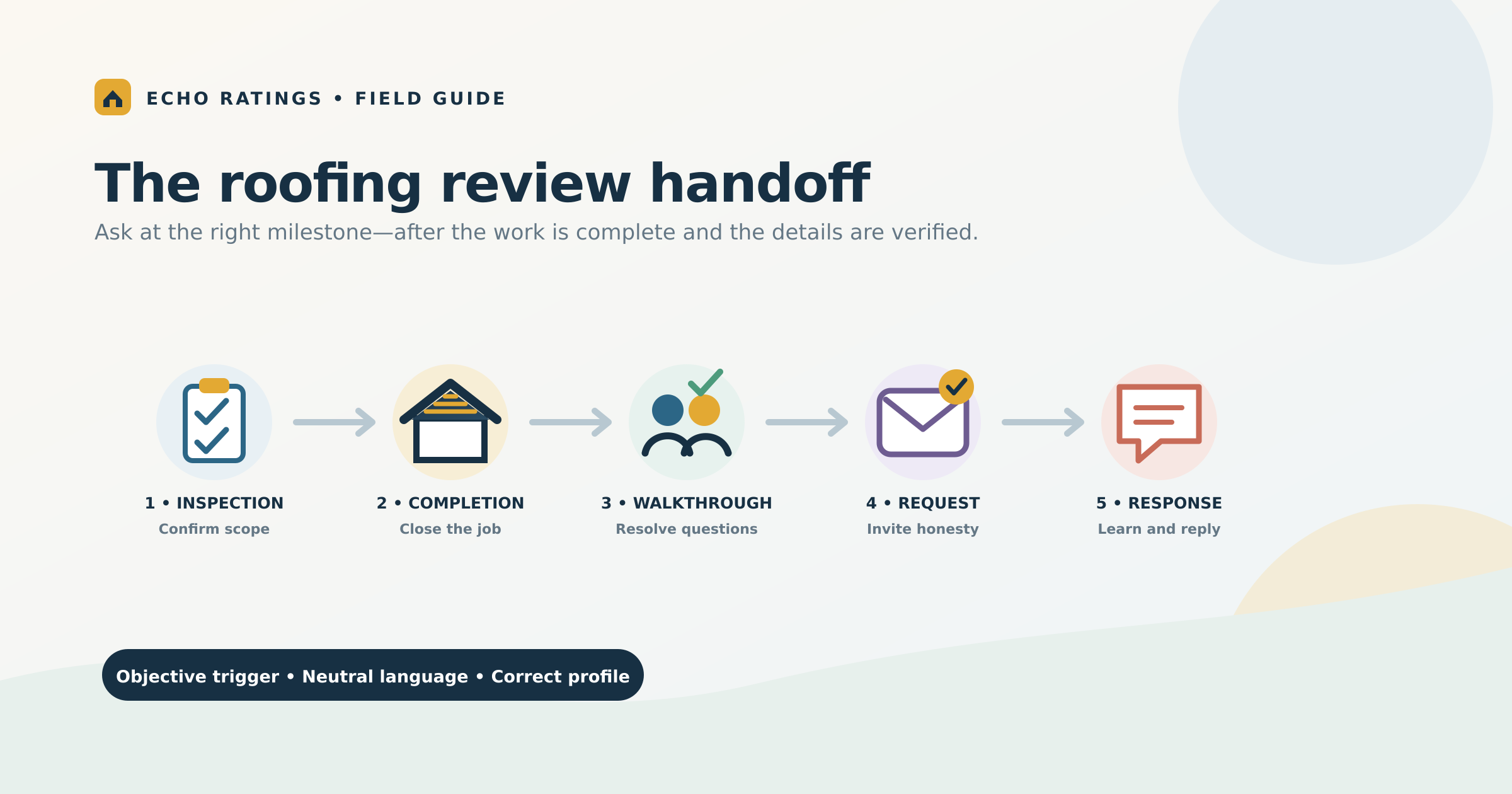
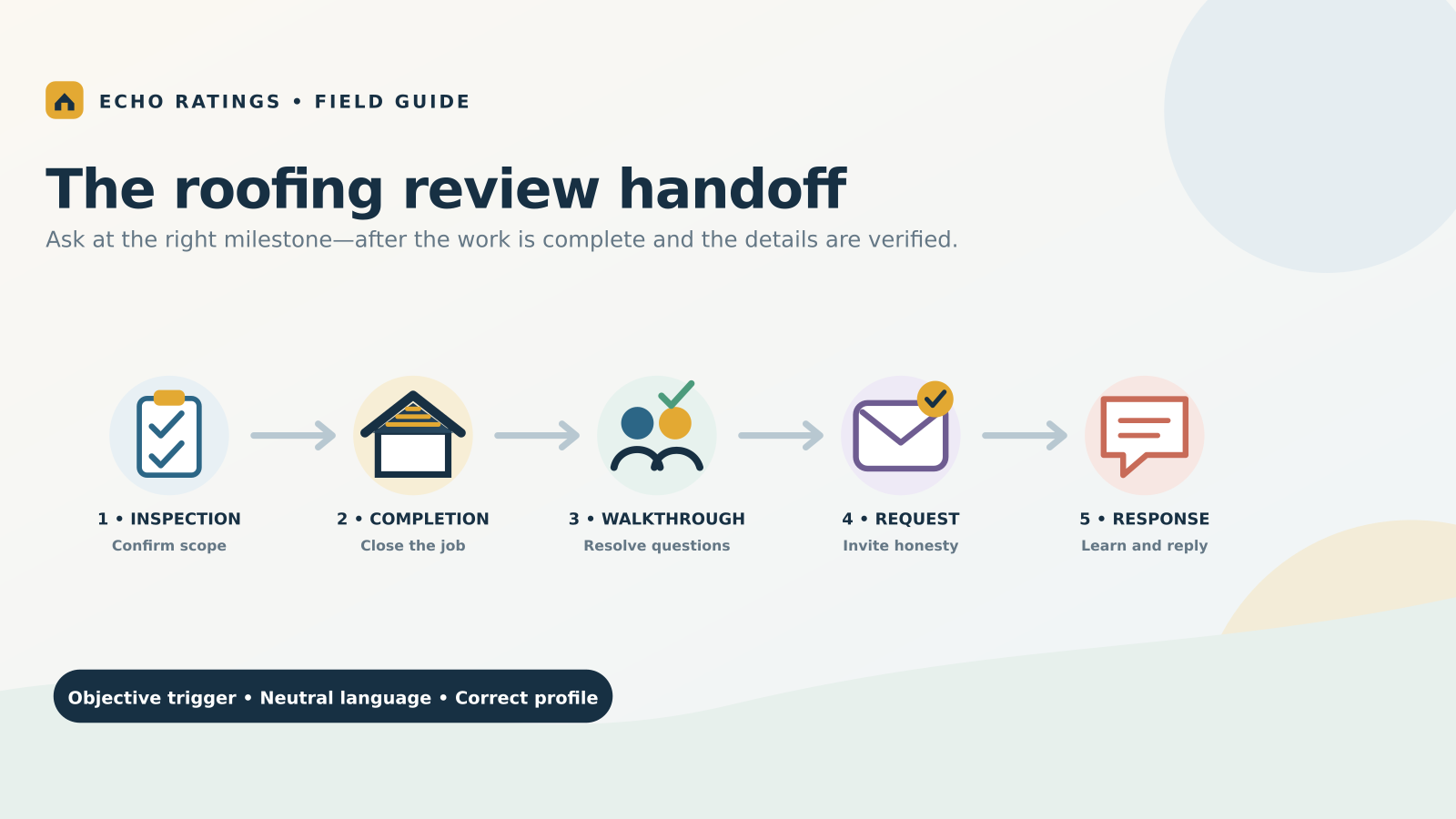
Use a five-step roofing review handoff
1. Close the field work accurately
The crew lead or project manager should record completion, upload required photos, and flag unresolved items before leaving the job. This protects the customer experience and keeps the review workflow from outrunning operations.
2. Verify the customer and location
The office should confirm the customer name, preferred contact method, job type, serving location, and correct review destination. Suppress duplicate records, internal tests, invalid contacts, and prior opt-outs. If two homeowners share a project, define whether one or both may receive the request so the company does not create an accidental burst.
3. Complete the walkthrough or completion call
Use the handoff to confirm cleanup, explain warranties or next steps, and give the customer a direct route for questions. This is not a satisfaction screen. Every eligible customer should retain the same opportunity to share honest public feedback whether the walkthrough is smooth or identifies a problem.
4. Send one clear request
Send the request soon after the verified completion event, during a reasonable local hour. Use the customer’s name, the company or branch name, and a single direct link. Google’s link and QR-code instructions explain how to generate and share the destination from a Business Profile.
A practical text message can be simple: “Hi Jordan, thank you for choosing Summit Roofing. If you have a moment, would you share an honest review of your experience? [review link]”
A practical email can add context: “Your roofing project is complete, and we appreciate the opportunity to work on your home. Would you share an honest review of the communication, workmanship, and overall experience? [review link]”
Use the Echo Ratings request templates for more neutral examples, then follow the review-link and QR-code guide to test the final path.
5. Use a limited reminder and a firm stop rule
One polite reminder may help when a customer intended to respond but was busy. Stop when the customer leaves a review, opts out, reaches the reminder limit, or enters a sensitive escalation that requires human handling. Do not keep sending because a campaign is behind a monthly target.
The guide to automating requests after a service call explains trigger, delay, suppression, and stop logic in more detail.
Make the field-to-office handoff explicit
A roofing request system works best when every role has a small, clear responsibility:
- Crew lead: confirms the work and cleanup are complete and records exceptions.
- Project manager: handles the walkthrough, verifies punch-list ownership, and documents promised follow-up.
- Office or customer-care team: verifies contact data and location routing, monitors delivery, and owns exceptions.
- Marketing or operations lead: controls templates, reviews performance, audits consistency, and prevents unauthorized workflow changes.
Technicians and salespeople can mention that the company values honest feedback, but the system should not depend on them selecting customers or asking for a particular rating. A centrally managed trigger gives every eligible project the same treatment.
Keep review collection separate from service recovery
Roofing projects can produce legitimate concerns about cleanup, landscaping, nails, scheduling, leaks, supplements, warranties, or communication. When a customer reports a problem, create a service task with a named owner and deadline. Do not make help conditional on changing, delaying, or removing a review.
A customer with an open issue may still receive the standard invitation if they meet the documented eligibility rule. If the company uses a narrowly defined pause for safety, legal, privacy, or insurance handling, document the reason and review it consistently. A complaint should not quietly become a filter for predicted negative sentiment.
Google’s Maps content policy allows businesses to encourage reviews based on genuine experiences without trying to influence the rating or content. It prohibits rating manipulation, including discouraging negative reviews or selectively requesting positive ones. The FTC’s current Consumer Reviews and Testimonials Rule Q&A addresses fake reviews, sentiment-conditioned compensation, insider relationships, and review suppression. Keep review invitations separate from promotions or compensation, and ask qualified counsel about any campaign-specific legal questions.
For a detailed workflow audit, use the Echo Ratings explanation of review gating.
Respond with verified project context
Roofing reviews often mention a specific estimator, project manager, crew, material, or problem. Before replying, verify the job record. A useful response acknowledges the customer’s experience without exposing private details or inventing facts.
For positive feedback
Thank the customer and reference one detail they actually shared. Avoid turning every reply into a sales pitch or repeating an identical paragraph across dozens of reviews.
For ordinary criticism
Acknowledge the concern, state that the team wants to review it, and provide a private contact path. Do not argue about the contract, insurance claim, address, payment, or warranty history in public.
For safety, legal, or insurance disputes
Pause the routine reply and escalate it to the designated manager. Preserve records and write only after the appropriate person has reviewed the facts. The negative-review response guide includes triage levels, templates, and privacy safeguards.
Handle storm volume without sacrificing accuracy
After a major weather event, roofing companies may close many projects at once, work with temporary staff, or expand into nearby markets. That is when duplicate requests, wrong-profile routing, and premature sends become more likely.
- Import projects in controlled batches and validate a sample before releasing messages.
- Keep separate location and territory identifiers even when one call center handles every market.
- Require completion evidence before an imported status can trigger a request.
- Monitor delivery failures, duplicate contacts, opt-outs, and routing exceptions each day.
- Keep templates stable during the surge; route exceptions to people instead of creating ad hoc branches.
Companies operating several staffed markets can use the multi-location review management guide for permissions, routing, and roll-up reporting.
Measure the workflow, not just the rating
A star rating is visible, but it does not show whether the underlying process is healthy. Review each location and job type using measures the team can control:
- Eligible completed projects
- Requests attempted, delivered, failed, and suppressed
- Time from verified completion to first request
- Duplicate sends and routing exceptions
- New review volume and review recency
- Response coverage and median response time
- Unresolved service-recovery tasks
- Recurring themes involving communication, cleanup, scheduling, workmanship, and follow-through
Compare results with the company’s own baseline rather than unsupported industry promises. Investigate gaps between completed jobs and requests sent. Read the feedback for operational patterns that can improve training, project updates, cleanup checks, and handoffs.
Launch the system in 30 days
Week 1: Map the process
List every roofing job type, completion status, responsible role, customer field, branch identifier, and review destination. Identify manual steps and exceptions.
Week 2: Build and test
Create the trigger, neutral message, verified link, limited reminder, opt-out handling, and stop conditions. Run test records for repairs, replacements, cancellations, callbacks, insurance projects, and multi-location jobs.
Week 3: Pilot one team
Use a representative branch or production team. Review every send and exception, then compare the request log with actual project records.
Week 4: Audit and expand
Confirm the workflow treats eligible customers consistently, routes them to the correct profile, stops correctly, and gives service issues a real owner. Expand only after the pilot passes those checks.
Teams comparing tools can use the guide to reputation management software for contractors to evaluate integrations, permissions, reporting, and safeguards.
Frequently asked questions
When should a roofer ask for a Google review?
Use an objective milestone after the customer-facing work is complete, required documentation is available, and the walkthrough or completion call has occurred. Define the exact milestone for repairs, replacements, inspections, and warranty work.
Should roofers ask after the estimate?
Ask for a service review only when the person had a genuine experience worth reviewing. A completed inspection with useful findings may qualify; a lead who only received an automated quote may not provide meaningful service feedback.
Can a crew member ask the homeowner directly?
A crew member can explain that honest feedback is welcome, but a system-triggered request is more consistent. It reduces selective asking and makes the correct location, message, timing, and stop rules easier to control.
What if the homeowner has an unresolved issue?
Assign the issue immediately and give it a real owner. Keep recovery separate from review collection, and do not bargain over public feedback. Use documented escalation rules for sensitive situations.
How many reminders should a roofing company send?
Start conservatively with one reminder. Stop after a review, opt-out, delivery failure, reminder limit, or documented escalation. Monitor complaints and opt-outs before changing the cadence.
Turn project completion into a dependable feedback loop
The best roofing review workflow is easy to explain: finish the work, verify the handoff, route the customer to the correct profile, invite an honest review, and respond with real context. That process creates more reliable feedback while giving the operations team a clear view of where service needs attention.
Explore the Echo Ratings product to organize requests, monitoring, and responses in one workflow. You can also compare pricing, establish a baseline with a free reputation audit, start a 14-day trial, or book a walkthrough.
This article provides general operational information, not legal advice. Review applicable messaging-consent, privacy, advertising, insurance, and platform requirements with qualified advisors for your business.